
Many email services limit how big an attachment can be. USB drives formatted as FAT32 reject any single file over 4 GB. Upload forms on file-sharing sites set their own limits. When an archive exceeds one of those thresholds, splitting it into numbered parts solves the problem. HanFlow Zip can split the archive as part of compressing, so each piece stays within the size you set.
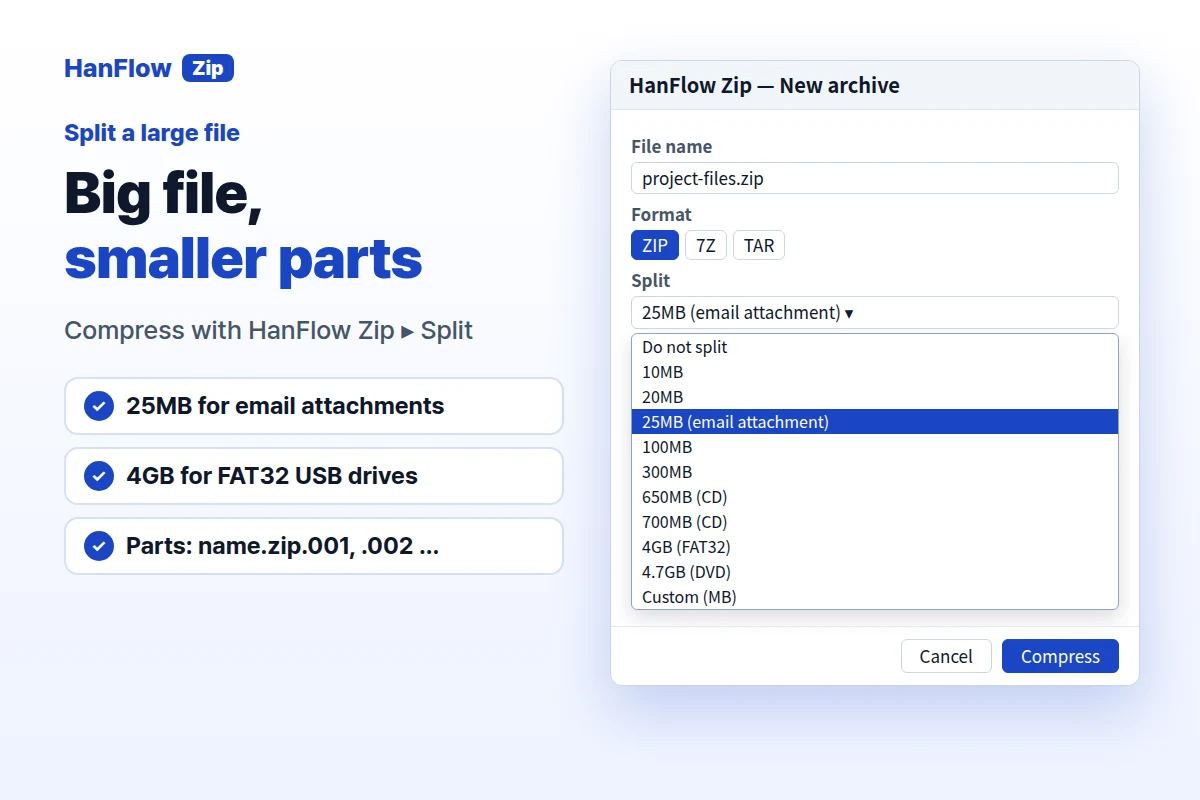
Split a file in four steps
- Select the files or folders in File Explorer. Right-click and choose Compress with HanFlow Zip. The compression window opens.
- Pick a Format (ZIP, 7Z, TAR or another supported format) and a Compression level.
- Open the Split dropdown. Choose a preset size or select Custom (MB) and type a number. The minimum is 1 MB.
- Click Compress. HanFlow Zip produces numbered parts —
name.zip.001,name.zip.002and so on. If the archive fits in one part, no split happens.
Which size to pick
- 10 MB / 20 MB — upload forms with low file-size limits.
- 25 MB (email attachment) — the preset labelled for email attachments.
- 100 MB / 300 MB — larger uploads where a moderate split is enough.
- 650 MB / 700 MB (CD) — sized for CD-capacity media.
- 4 GB (FAT32) — stays under the 4 GB single-file limit of FAT32 USB drives.
- 4.7 GB (DVD) — fits a single-layer DVD.
- Custom (MB) — type any value of at least 1 MB.
Opening the parts
Open the .001 file in HanFlow Zip. It reads the volumes in sequence. All parts must be in the same folder. If one is missing, HanFlow Zip shows A split volume is missing. Put all volumes in the same folder.
Good to know
- Items inside a split archive cannot be added, changed or deleted. Extract everything first, then compress again.
- A split archive cannot exceed 999 parts. If it would, pick a larger part size.
- A password is available for the ZIP format only (AES-256, AES-128 or ZipCrypto), in the same compression window.
- You can also set a default split size in Settings so you do not have to choose it every time.
Frequently asked questions
Can I add files to a split archive later?
No. Add files and split cannot be used together. Extract the archive into one piece, add the files and compress again with splitting turned on.
What happens if I lose one of the parts?
HanFlow Zip needs every part in the same folder. A missing volume stops extraction and shows an error asking you to put all volumes together.
Does the split option work with every format?
It works with every format HanFlow Zip creates — ZIP, 7Z, TAR and others. Password encryption, however, is available for ZIP only.