
Right-click the HanFlow Player window, choose Open folder…, and the folder's media files fill the playlist. Press L to see them, then save the list as an M3U file you can reopen anytime.
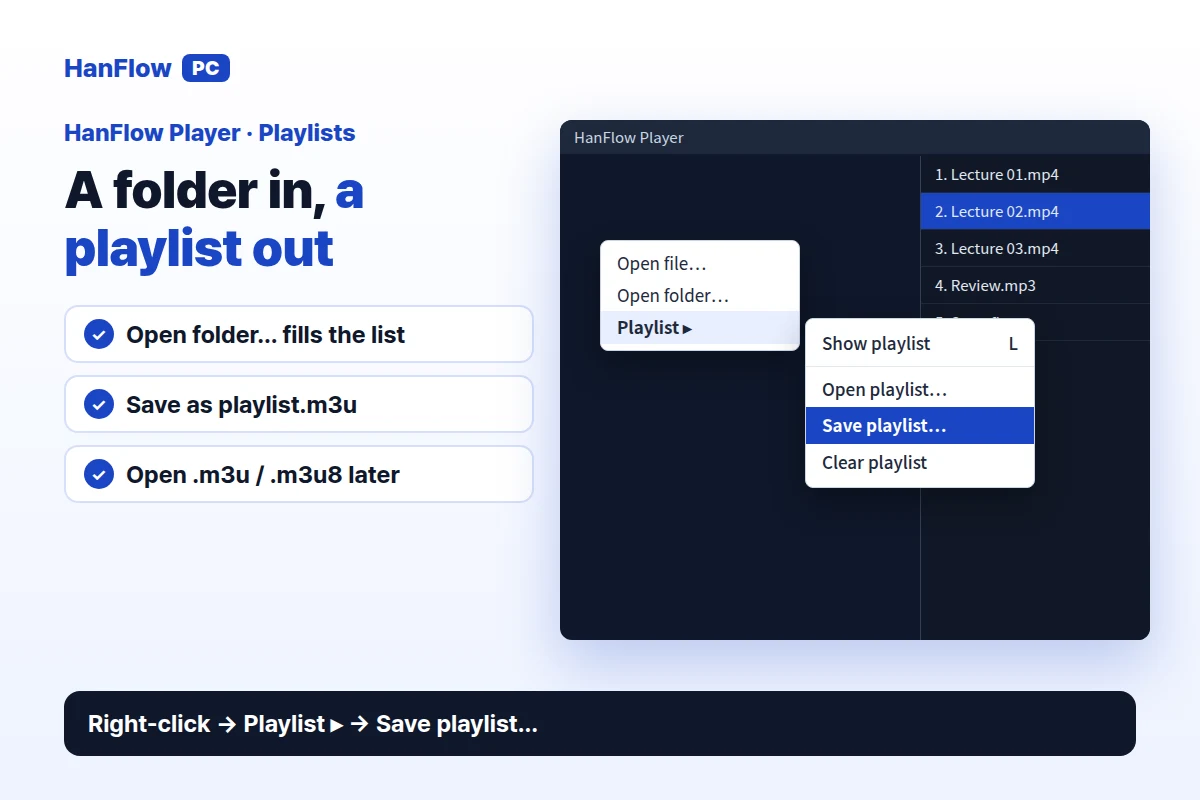
Make a playlist from a folder
- Open HanFlow Player. Right-click the player window and choose Open folder….
- In the Select video folder dialog, pick a folder. Its media files load into the playlist.
- Press L to show the playlist panel and confirm the items are there.
You can also open a single video or song. HanFlow Player fills the playlist with the other media files in the same folder, so N (Next) and P (Previous) move through them.
Add and remove items
Drag files or a folder onto the player window to add them to the playlist. To remove an item, open the playlist panel (L), right-click the item, and choose Remove from list. Choose Clear list to empty the playlist entirely.
Save it as an M3U file
- Right-click the player window → Playlist ▸ → Save playlist….
- Choose a location and file name. The default is playlist.m3u.
- Click Save. The playlist is written to an .m3u file — the only file HanFlow Player writes to disk.
Open it again later
Right-click the player window → Playlist ▸ → Open playlist… and pick your .m3u or .m3u8 file. Paths inside the M3U are read relative to the M3U file's own folder, so keep the file near the media or preserve the same folder structure.
Frequently asked questions
What formats can I add to a playlist?
Video (mp4, mkv, webm, avi, mov, wmv) and music (mp3, m4a, aac, flac, wav, wma, ogg, opus). Playback depends on the Windows codecs installed on your PC.
Can I open a playlist someone else saved?
Yes. Open playlist… reads .m3u and .m3u8 files. Opening playlists works even after the trial ends.
Does saving a playlist require a license?
During the 30-day trial, no — every feature works. After the trial, playback continues but saving playlists requires a license.
HanFlow Player runs on 64-bit Windows. The 30-day trial gives you every feature. After the trial, playback continues. Saving playlists, playback speed, and volume boost above 100 % require a license.