
Every HanFlow app comes with a 30-day trial. Want more time? Invite a friend — or apply a code a friend sent you — and both of you get 30 extra days. No payment method required.
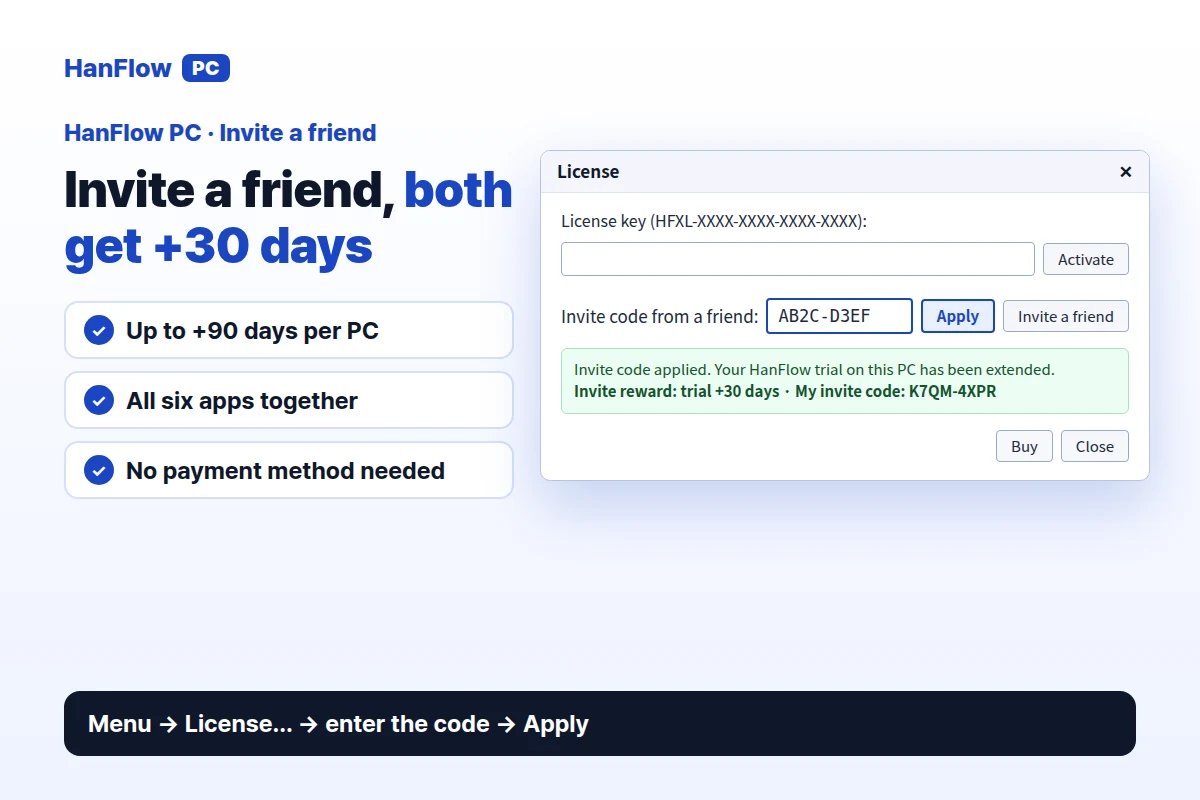
Apply a code a friend sent you
- Open any HanFlow app. In the menu, click License… to open the license window.
- At the bottom, find the Invite code from a friend: field. Type or paste the code — it looks like AB2C-D3EF.
- Click Apply. You will see: "Invite code applied. Your HanFlow trial on this PC has been extended."
Invite a friend with your code
- Open any HanFlow app and click License… in the menu.
- Click Invite a friend (the same item is also in the menu). Your invite page opens with your code already in the link — copy it, share it, or send it by email.
- From then on, the license window also shows My invite code:.
- When your friend applies your code, you both get 30 extra trial days.
How the extra days add up
Each successful invite adds 30 days for both you and your friend. One PC can get up to 90 extra trial days in total. The extension covers all six HanFlow apps together — Cap, Cut, Image, Finder, Zip, and Player. Your code works for up to 20 friends.
When a code won't apply
- You cannot use your own code, even from a different account on the same PC.
- A PC can receive only one friend's invite code.
- A code that has already reached 20 uses is full.
- A code that does not exist will be rejected.
Frequently asked questions
What happens when the trial ends?
Some features are locked. Buying a license unlocks everything again.
Do I need to enter the code in every app?
No. The extension covers all six HanFlow apps on that PC. Apply the code once in any app and the days appear everywhere.
Can students get more time with a university email?
Yes. With a university email you can use the HanFlow PC apps for a year without payment — a separate path from the invite system.